Read skeleton & joint data
Many Unreal projects need to read a tracked person's skeleton directly — the bone hierarchy, per-joint positions, and per-joint rotations — whether for retargeting, gameplay logic, custom tooling, or motion analysis. This guide shows exactly what the AR 51 Unreal SDK exposes and how to read it, in Blueprint and C++, starting from the simplest case and adding one layer at a time.
What you can read
| Data | Available? | How |
|---|---|---|
| Skeletal hierarchy (bone structure) | ✅ | Get Num Bones → Get Bone Name / Get Parent Bone (BP); reference skeleton (C++) |
| Joint positions (3D coordinates) | ✅ | Get Socket Location / Get Socket Transform — world and component space |
| Joint rotations (quaternion & Euler) | ✅ | Get Socket Rotation → Euler, To Quaternion → quaternion |
| Per-joint tracking confidence | ❌ | Not exposed in the SDK's public API |
Positions are Unreal world or component space in centimetres (FVector). Rotations are
FRotator (Euler) or FQuat (quaternion); FRotator.Quaternion() converts Euler → quaternion.
Step 1 — Get a person's character
Every tracked person is delivered by the USkeletonConsumer singleton as a
UAR51Character — the live skeletal mesh you read joints from. Because UAR51Character is a
UPoseableMeshComponent, all the standard bone-read nodes and APIs work on it directly.
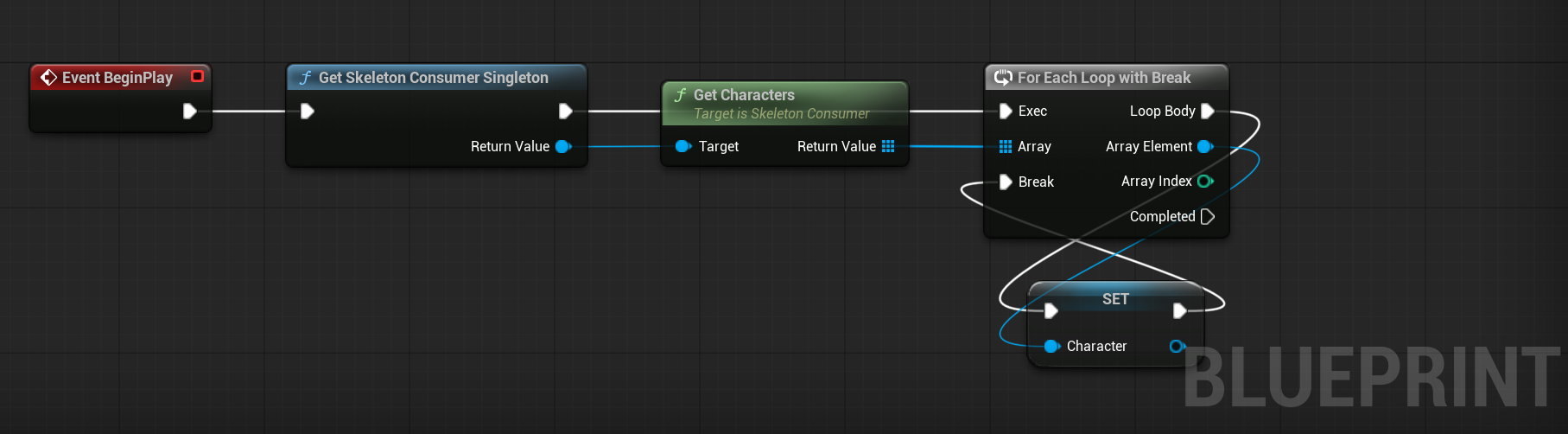
The simplest start: grab the first tracked person.
#include "Clients/SkeletonConsumer.h"
#include "AR51Character.h"

USkeletonConsumer* Consumer = USkeletonConsumer::GetSkeletonConsumerSingleton();
for (UAR51Character* Character : Consumer->GetCharacters())   // one per tracked person
{
    if (!Character) continue;
    // read joints from Character — see Step 2
}
GetCharacters() returns every currently tracked skeleton (TArray<UAR51Character*>); take element
[0] for the first. This is the id-free entry point — start here.
GetActivePerson()GetActivePerson() returns only the skeleton bound to the headset/XR camera (the local wearer).
A desktop analysis app has no headset, so there's typically no active person — use GetCharacters().
Target a specific person — by Person ID
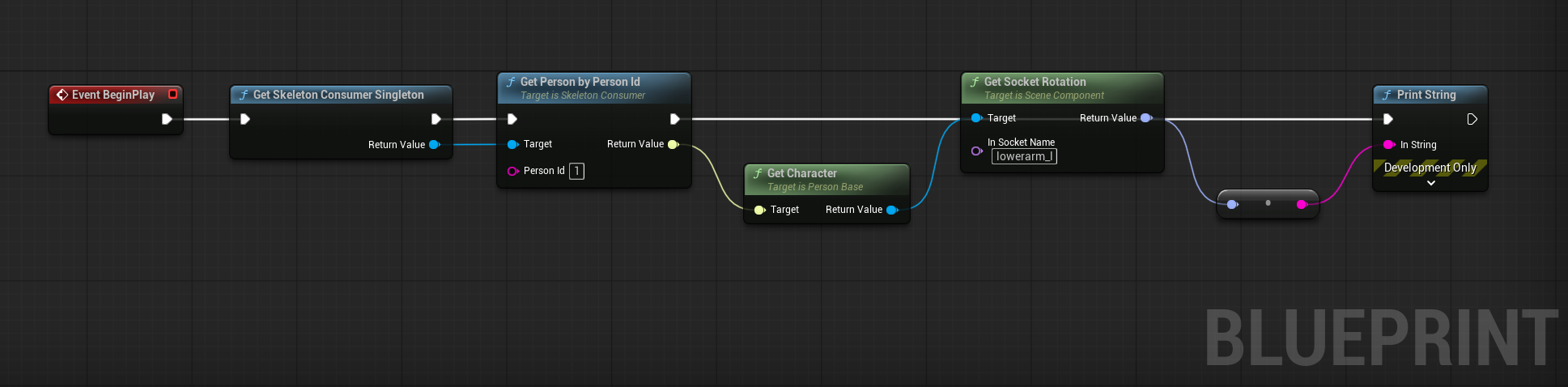
With many people in the space, follow one by its Person ID. You don't invent the ID — you
receive it from the person events (On Person Detected / On Person Updated), then look the person
up and get their character:
TScriptInterface<IPersonBase> Person = Consumer->GetPersonByPersonId(PersonId); // PersonId from an event
if (Person && IPersonBase::Execute_IsTracked(Person.GetObject()))
{
    UAR51Character* Character = IPersonBase::Execute_GetCharacter(Person.GetObject());
}
The Person ID is a tracking id — stable only while the person is continuously tracked. If they leave the capture area and return, they get a new Person ID. Use it to follow someone frame-to-frame within a session, not as a long-term identity.
Follow a registered person — by Entity ID (advanced)
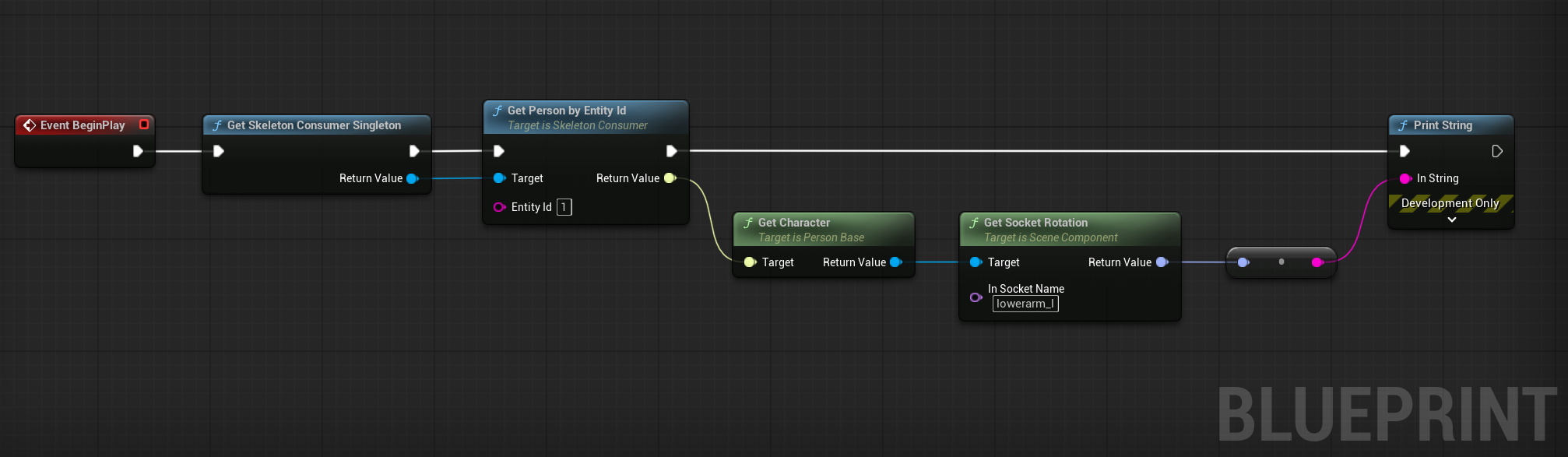
For a durable identity that survives leaving and re-entering the space, use an Entity ID (or its human-readable display name). An operator registers people in AR 51 Mocap Studio (re-ID), and the persistent Entity ID + display name are shared to every Unity and Unreal client.
TScriptInterface<IPersonBase> ById   = Consumer->GetPersonByEntityId(TEXT("1"));
TScriptInterface<IPersonBase> ByName = Consumer->GetPersonByEntityDisplayName(TEXT("Player 7"));
UAR51Character* Character = IPersonBase::Execute_GetCharacter(ById.GetObject());
Person ID vs Entity ID, in one line: Person ID = transient tracking handle (valid only while tracked); Entity ID = registered, persistent identity (survives re-entry, carries a display name). Registering entities is an operator step in Mocap Studio — see Entity identification for the full workflow.
| Goal | Blueprint node | C++ |
|---|---|---|
| All tracked characters | Get Characters | GetCharacters() → TArray<UAR51Character*> |
| One person by tracking id | Get Person By Person Id | GetPersonByPersonId(FString) → IPersonBase |
| One person by registered identity | Get Person By Entity Id · Get Person By Entity Display Name | GetPersonByEntityId(FString) · GetPersonByEntityDisplayName(FString) |
Step 2 — Read joint data from the character
Once you hold a UAR51Character, read the three things a motion pipeline needs.
Skeletal hierarchy (bone structure)
Enumerate every bone and walk parent → child — entirely in Blueprint, or via the C++ reference skeleton.
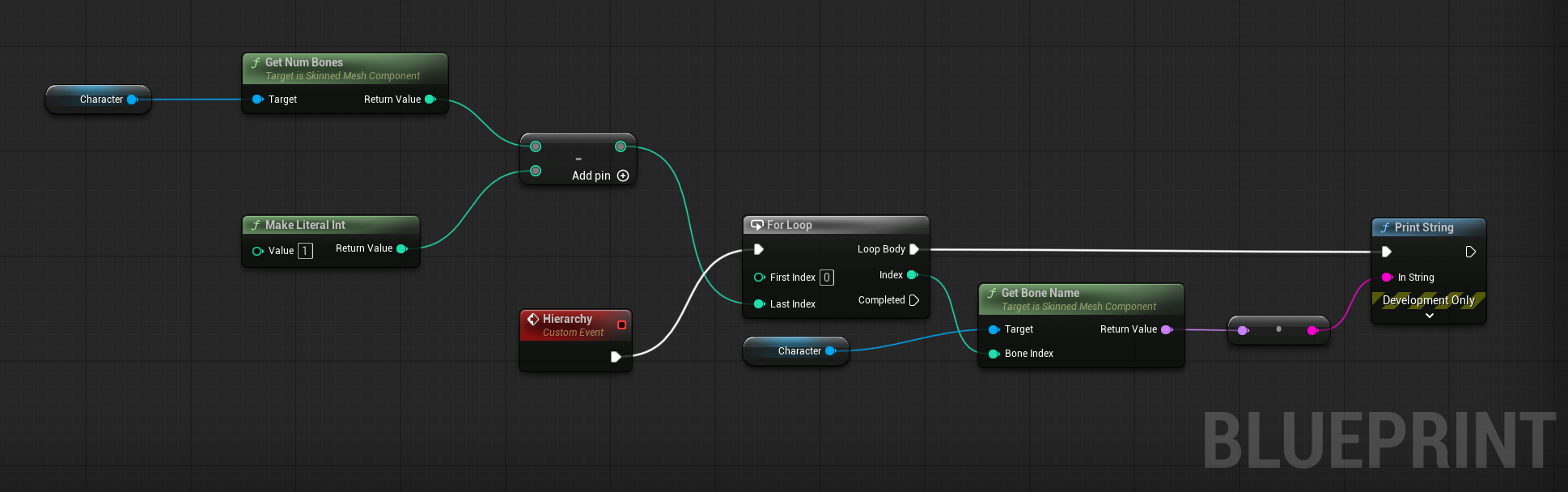
Get Num Bones— total bone countGet Bone Name(index → name) andGet Bone Index(name → index)Get Parent Bone(bone name → parent name) — walk up the hierarchy
if (USkinnedAsset* Mesh = Character->GetSkinnedAsset())
{
    const FReferenceSkeleton& Ref = Mesh->GetRefSkeleton();
    for (int32 i = 0; i < Ref.GetNum(); ++i)
    {
        const FName Bone      = Ref.GetBoneName(i);
        const int32 ParentIdx = Ref.GetParentIndex(i);                    // -1 for the root
        const FName Parent    = (ParentIdx >= 0) ? Ref.GetBoneName(ParentIdx) : NAME_None;
        // Bone `Bone` is a child of `Parent`
    }
}
Joint positions (3D)
Read any bone by name, in world or component (local) space.
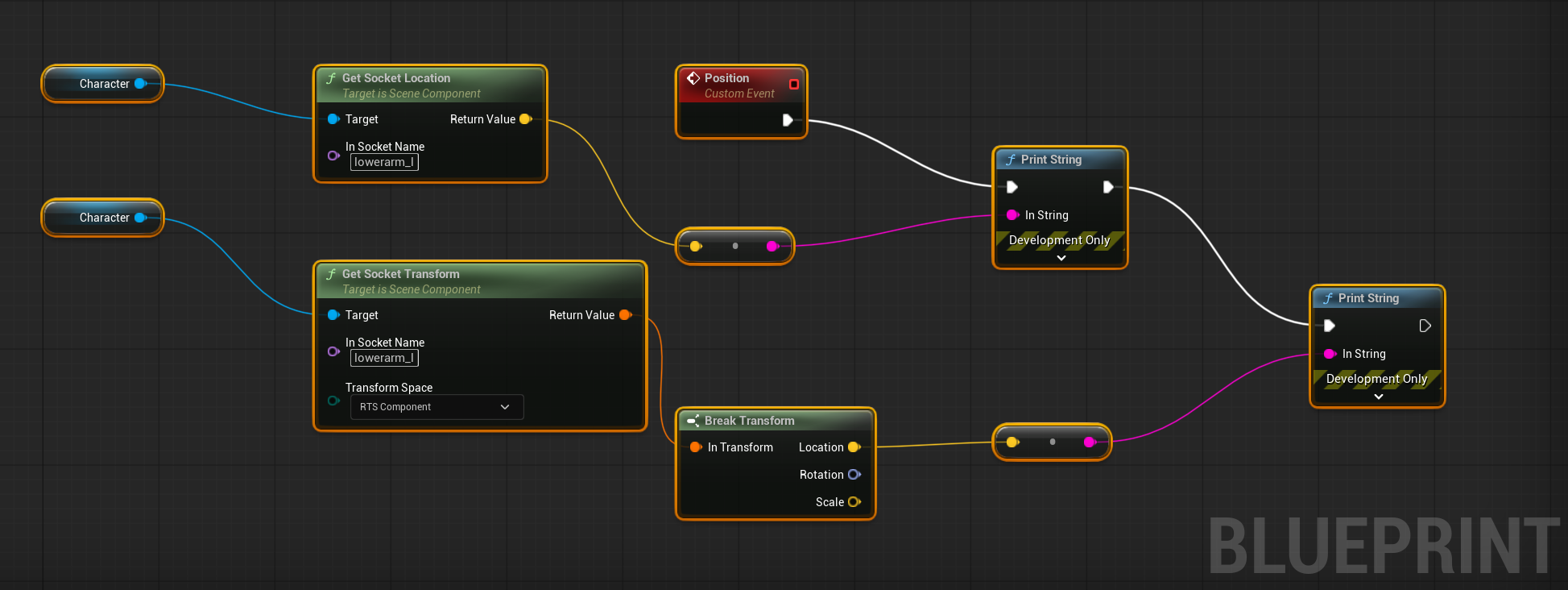
Get Socket Location(bone name) — world spaceGet Socket Transform(bone name, Component) →Break Transform→ Location — component/local space
const FName Bone = TEXT("lowerarm_l");                                  // e.g. left elbow
FVector WorldPos = Character->GetBoneLocationByName(Bone, EBoneSpaces::WorldSpace);
FVector LocalPos = Character->GetBoneLocationByName(Bone, EBoneSpaces::ComponentSpace);

// Convenience getters (C++):
FVector Head      = Character->GetHeadPosition();
FVector LeftWrist = Character->GetLeftWristPosition();
Joint rotations (quaternion & Euler)
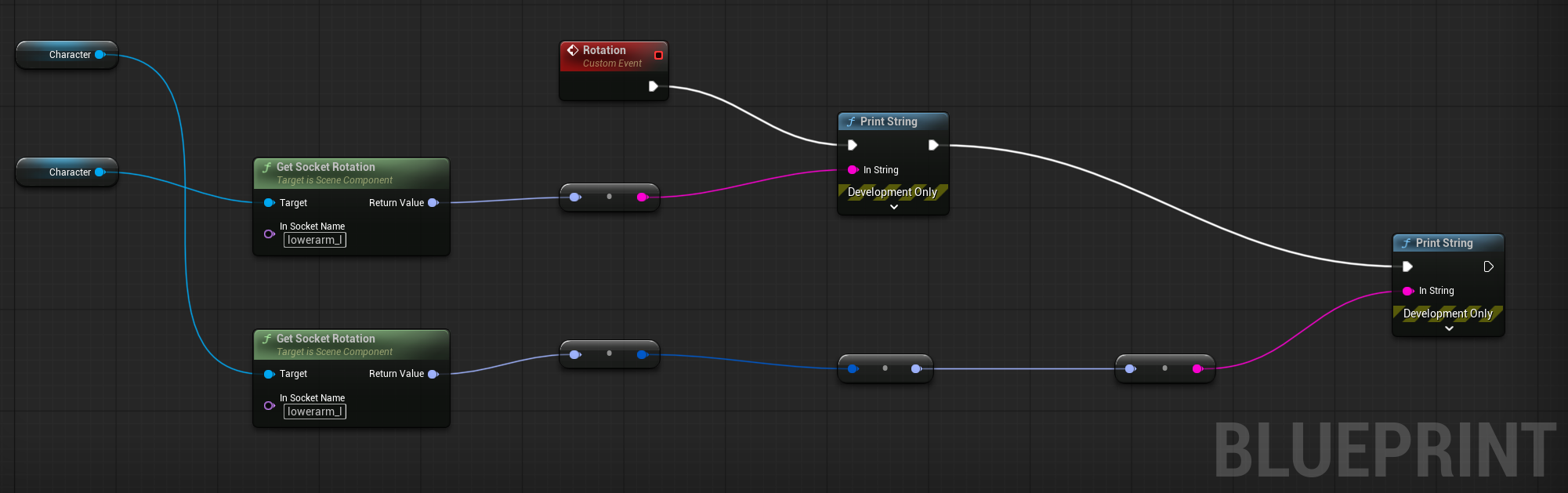
Get Socket Rotation(bone name) → Rotator (Euler)To Quaternion (Rotator)→ Quat
const FName Bone = TEXT("lowerarm_l");
FRotator Euler = Character->GetBoneRotationByName(Bone, EBoneSpaces::WorldSpace); // Euler
FQuat    Quat  = Euler.Quaternion();                                             // quaternion
Blueprint has no "to string" for a quaternion — the sample converts back to a Rotator just to print
it. In real code you feed the FQuat straight into your math; the read you want is the
To Quaternion node.
Read every joint of every person
Putting it together — iterate all tracked people, all bones, reading position + rotation:
USkeletonConsumer* Consumer = USkeletonConsumer::GetSkeletonConsumerSingleton();
for (UAR51Character* Character : Consumer->GetCharacters())
{
    USkinnedAsset* Mesh = Character ? Character->GetSkinnedAsset() : nullptr;
    if (!Mesh) continue;

    const FReferenceSkeleton& Ref = Mesh->GetRefSkeleton();
    for (int32 i = 0; i < Ref.GetNum(); ++i)
    {
        const FName   Bone = Ref.GetBoneName(i);
        const FVector Pos  = Character->GetBoneLocationByName(Bone, EBoneSpaces::WorldSpace);
        const FQuat   Rot  = Character->GetBoneRotationByName(Bone, EBoneSpaces::WorldSpace).Quaternion();
        // feed Pos / Rot into your motion-analysis pipeline
    }
}
Tracking confidence
Per-joint tracking confidence is not exposed in the SDK's public API — there is no Blueprint node or public C++ getter for it.
Bone names such as lowerarm_l follow your character's own skeletal rig. See also the
Unreal SDK overview and Entity identification.