Connecting (ServiceManager & SkeletonConsumer)
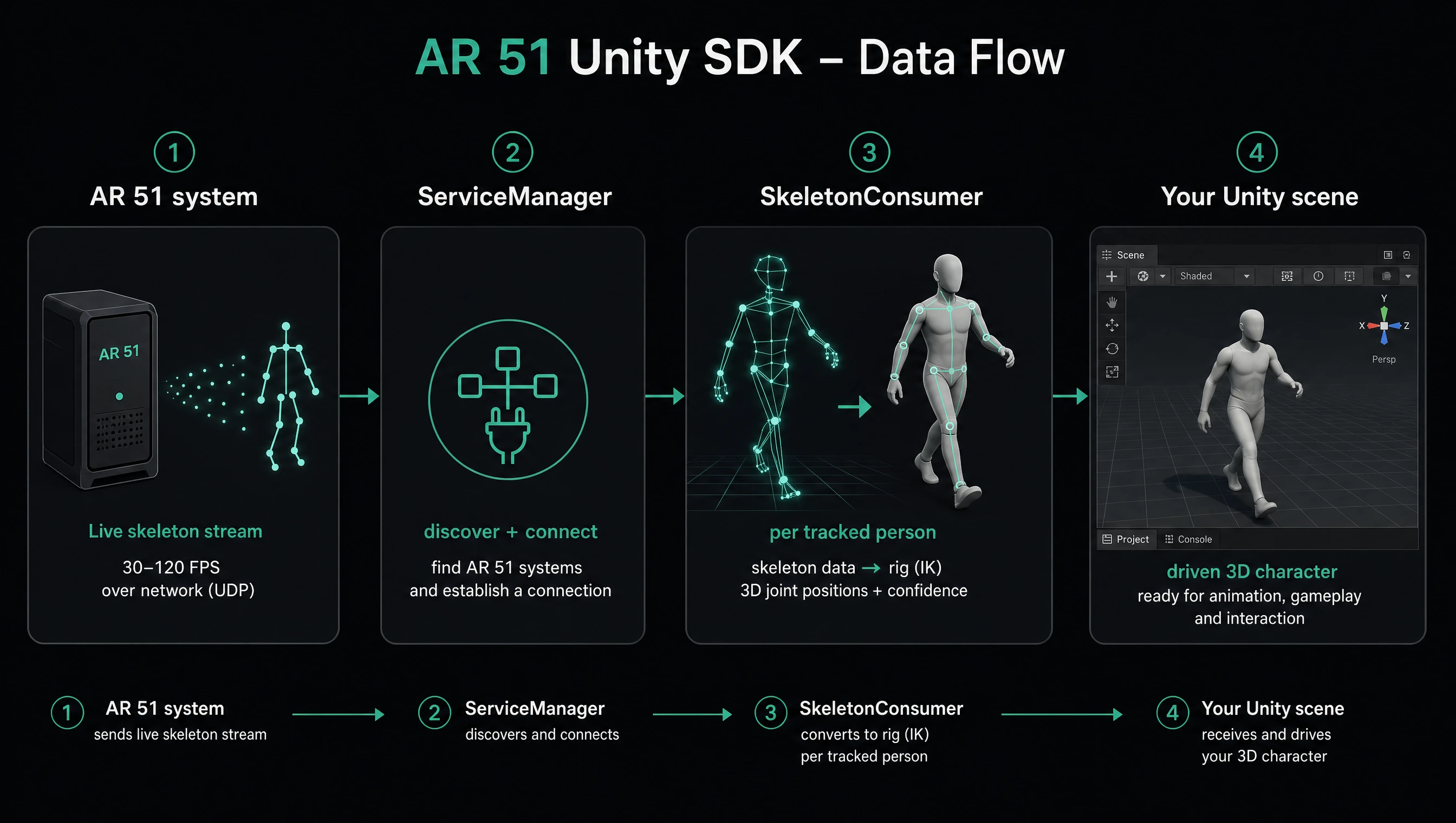
A Unity client connects to AR 51 with two singleton components:
ServiceManager— the connection entry point. Drop it in your scene; it stands up the SDK's local service host, discovers the AR 51 components on the network (CVS, calibration, …), and exposes the live connection.SkeletonConsumer— receives the skeleton stream, creates aPerson(and anAR51Character) for each tracked skeleton, and drives it with IK every frame.
All positions are Unity world-space meters; rotations are Quaternion; angles are degrees. Namespace: AR51.Unity.SDK.
1. Add the ServiceManager
Place a ServiceManager on a GameObject in your scene (or get the singleton in code). It starts the connection itself on Start — there is no explicit Connect() call; placing the component and successful discovery is what establishes the connection. Configure it in the Inspector (or before Start):
public bool UseRandomServicePort = true;   // pick a free TCP port for the local service
public int  DiscoveryPort;                  // UDP discovery port
public bool RunOMS = false;                 // host an embedded OMS in-process
public bool IsDedicatedGameServer = false;  // run this instance as a dedicated game server
public string DedicatedOmsAddress = "";     // explicit OMS address for DGS
public HandProviderType HandProvider;       // hand-tracking source (None/OVR/UltraLeap/HTC/HTC_Wave)
Check connection state through the static members:
ServiceManager.IsConnected         // underlying server is up
ServiceManager.IsCvsConnected      // at least one CVS (vision) component is connected
ServiceManager.IsCalibrationConnected
ServiceManager.Server              // the live connection container (null until startup completes)
Subscribe to know when it's ready or when components join/leave:
manager.OnStarted += (s, e) => Debug.Log("SDK started; Server ready");
manager.OnRegistrationChanged += (s, e) => { /* a component joined or left */ };
To wait for a specific service before issuing calls:
// awaits until a component advertising the service appears (or the token cancels / times out)
await ServiceManager.WaitForService(ServiceNames.SkeletonService, token);
ServiceNames holds the canonical names: SkeletonService, ObjectDetectionService ("6DofService"), CalibrationService, CameraFeedService.
Reconnect() / Disconnect() resume / pause the connection afterwards.
2. Add the SkeletonConsumer
Add a SkeletonConsumer (also a singleton component) and assign one or more character prefabs in the Inspector. Each prefab must carry an AR51Character on a valid humanoid rig — validate it:
foreach (var prefab in SkeletonConsumer.Instance.CharacterPrefabs)
    if (!prefab.ValidateCharacter())
        Debug.LogError("Invalid rig: " + string.Join(", ", prefab.GetMissingRequiredMappings()));
Once connected, each tracked person automatically gets its AR51Character instantiated and driven — you don't call IK yourself (SkeletonConsumer does it in LateUpdate). React via events:
consumer.OnPersonCreated  += (s, e) => Debug.Log($"Character spawned for skeleton {e.Person.Id}");
consumer.OnPersonDeleted  += (s, e) => { /* a tracked person was removed */ };
consumer.OnSkeletonReceived += (s, e) => { var joints = e.Skeleton.GetPositions<Vector3>(); /* meters */ };
A Person is created only after MinSkeletonUpdateBeforeBirth updates (default 5) and removed after InactivePersonMaxSeconds (default 1s) without updates.
3. Minimal end-to-end example
Connect → receive skeletons → drive characters, using only the public API:
using AR51.Unity.SDK;
using UnityEngine;

public class Bootstrap : MonoBehaviour
{
    void Start()
    {
        var manager  = ServiceManager.Instance;   // connection entry point (starts on its own)
        var consumer = SkeletonConsumer.Instance;  // drives characters from the skeleton stream

        // Prefabs are normally assigned in the Inspector; validate the rigs:
        foreach (var prefab in consumer.CharacterPrefabs)
            if (!prefab.ValidateCharacter())
                Debug.LogError("Invalid rig: " + string.Join(", ", prefab.GetMissingRequiredMappings()));

        manager.OnStarted        += (s, e) => Debug.Log("Connected: " + ServiceManager.IsConnected);
        consumer.OnPersonCreated += (s, e) => Debug.Log($"Spawned character for {e.Person.Id}");
    }

    void Update()
    {
        if (!ServiceManager.IsCvsConnected) return;

        foreach (var person in SkeletonConsumer.Instance.Persons)
        {
            GameObject model   = person.Model;          // live character GameObject
            Vector3 headWorld  = person.HeadPosition;   // meters
            Vector3 rightWrist = person.Positions[Joints.RWrist];
            // person.Confidence[...] gives per-joint confidence
        }
    }
}
A few details here are inferred from the SDK source and pending confirmation: ServiceManager connects in its private Start() (no public Connect()), and assigning CharacterPrefabs at runtime after startup may require re-validation — the normal path is to set prefabs in the Inspector before Play.
Next
- Adding a new character
- Unity API reference — every public type, event, and data model.