System architecture overview
System Overview
AR 51 is an on-prem, local-network system: high-speed cameras feed a single AI server, which serves Mocap Studio and the Unity/Unreal clients over your local network.
Camera connection options
The cameras produce a large, sustained data stream, so they need dedicated bandwidth to the server. There are two supported topologies.
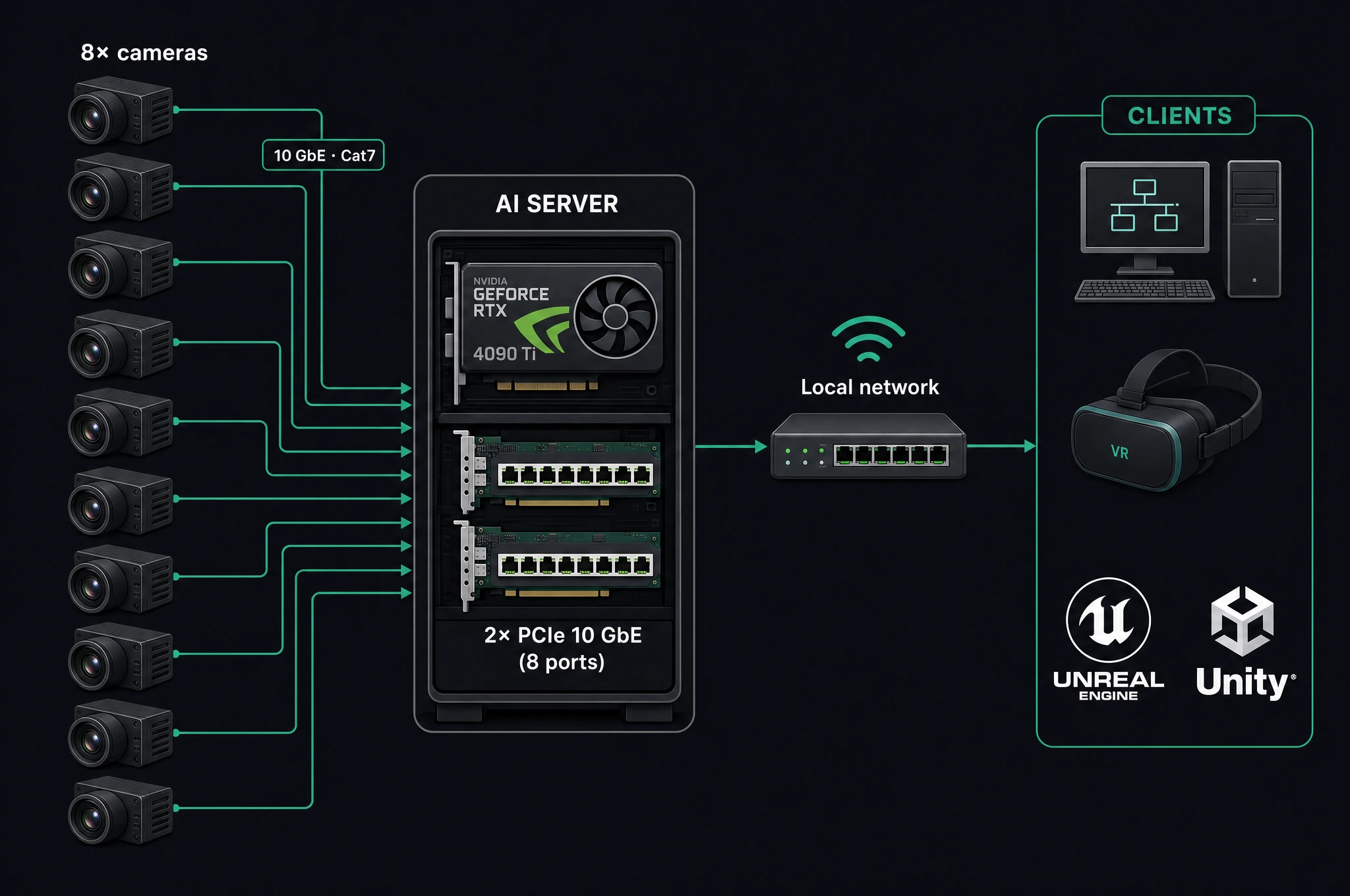
Option A — Cameras wired directly to the server
Each camera runs over its own 10 GbE link straight into the server's PCIe network cards (two PCIe4 ×4 cards = eight 10 GbE ports). No extra hardware between cameras and server.
Option B — Cameras through a 100 G aggregation switch (recommended)
The cameras connect to a qualified high-bandwidth switch (the fs.com 100 G switch), which aggregates them and sends a single 100 G fiber uplink (SFP28) to the server. Everything downstream is identical. The payoff is one cable to the server instead of eight, cleaner cabling, and easier scaling.
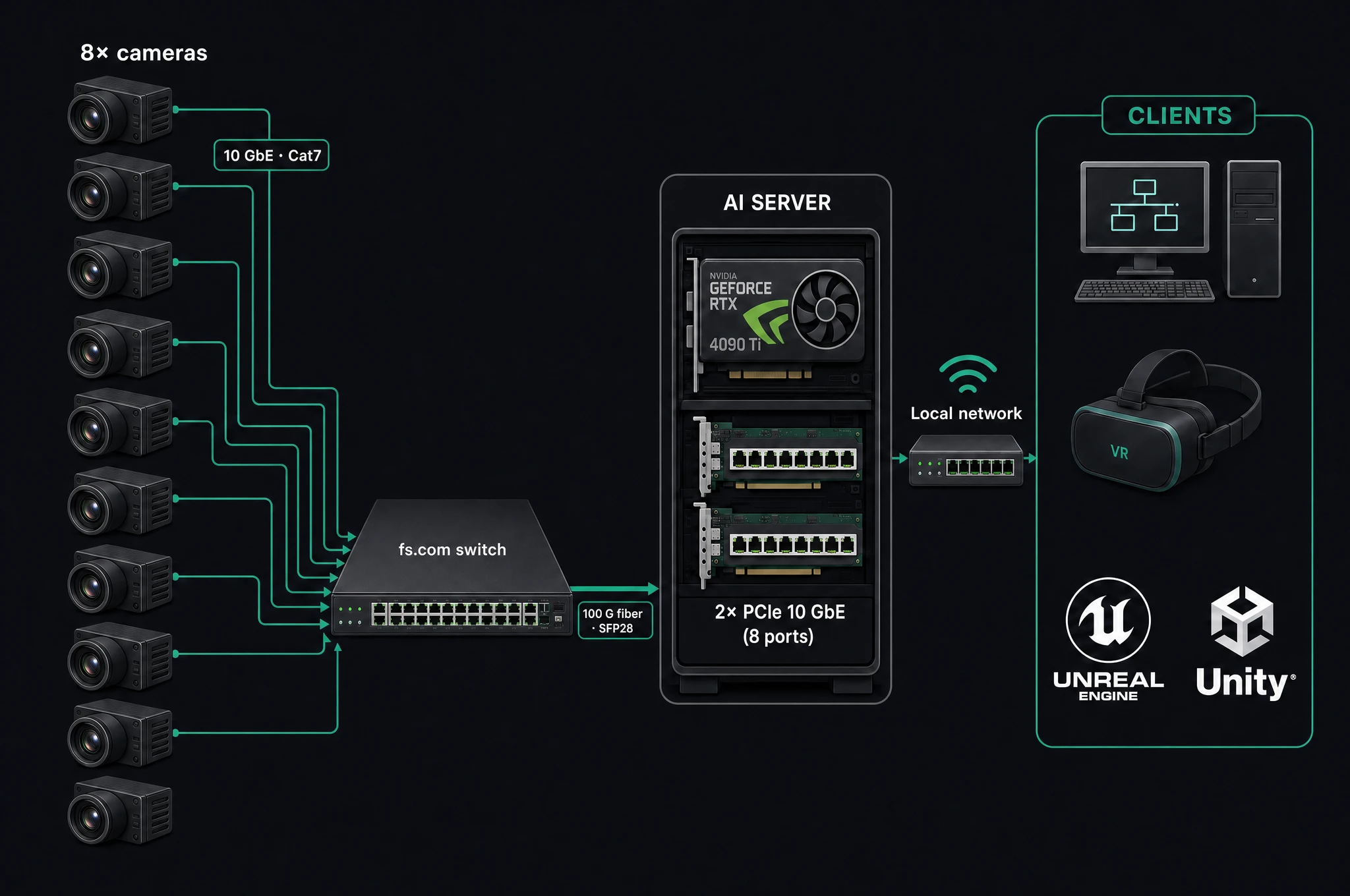
→ Setup steps: Configure the fs.com switch (100 G).
High-Resolution Cameras
The system utilizes an array of cameras, available in both 9MP and 5MP models, each capable of recording at a high-speed rate of 120 frames per second. This setup ensures the capture of smooth and precise motion data, which is crucial for the fidelity of the end-use application, whether it be for immersive VR experiences, realistic character animations in games, or accurate motion analysis in sports science. Since the data that is gathered by the cameras is massive, each camera needs to be connected by a fast ethernet connection directly to the AI server.
Do not put the cameras behind an ordinary router or consumer switch — they can't sustain this throughput. Use either a direct connection (Option A) or the qualified 100 G aggregation switch (Option B). Also use high-quality cables: Cat7, or Cat6a for shorter distances.
The AI-Server
The AI-Server, the processing nucleus of the system, is outfitted with an high-end NVIDIA graphics card. To support the high bandwidth requirements of multiple camera inputs, the server includes two PCI Express PCIe4 x4 ethernet extension cards, each providing four 10Gbps ports, totaling eight ports to accommodate the connectivity for all cameras.
Ensure that the AI-Server meets the requirements by reviewing the minimum specifications detailed on the provided page.
Ultra-Low Latency - an On-Prem Solution
With the high-speed capture and processing capabilities, the system achieves an ultra-low latency of 9ms. This rapid response time is pivotal for real-time applications, ensuring that VR users and VFX artists can interact with and capture motion data seamlessly.
Mocap Studio
Complementing the hardware is Mocap Studio, AR 51's proprietary desktop application that acts as a client for visualizing, editing, and exporting motion capture data into various industry-standard animation file formats, including FBX. Mocap Studio is an invaluable resource for VFX artists, animators, and researchers, providing an extensive suite of tools for detailed motion editing and data management.
Cross-Platform Clients - Unity or Unreal
The system's versatility extends to its client-side applications, supporting desktop VR systems, standalone VR headsets, laptops, and workstations. The AR 51's plug-and-play plugins for Unity and Unreal engines facilitate effortless integration, automatically detecting the server to minimize setup time for developers and artists. These capabilities make it an ideal tool for creating interactive VR experiences, animating 3D characters, or visualizing motion for analytical purposes.
Mocap Unleashed Network
A Local Network Solution
The Mocap Unleashed solution operates within a local network framework. This necessitates that all components are linked to the same network subnet. Once connected to this network segment, each component signals its presence to the network, allowing the system to automatically recognize all connected components.
All components of the system must be linked to the same local network for proper operation. Failure to connect them to the same network will result in an inability for the components to recognize each other.
Ensuring a High-Performance Network
To maintain the system's integrity and its capacity for real-time operations, it is critical that all network connections are sufficiently robust to handle the data throughput demands of 10 Gigabit cameras. Whether the cameras are wired directly to the server's PCIe cards (Option A) or aggregated through the 100 G switch (Option B), every link must carry full camera throughput. It is also important to use high-quality network cables, specifically cat7 cables, or cat6a for shorter distances, to ensure optimal performance.
Using slow cables or those susceptible to interference can significantly impact the system's performance negatively. If you decide to use CAT6a cables, ensure they are kept at a distance from power cables to avoid electrical interference, as CAT6a are unshielded and more susceptible.
Disabling Deep-Packet Inspection
Certain antivirus software, such as Trend-Micro, may implement deep packet inspection on all incoming and outgoing data, significantly impairing the system's performance and data throughput. To avoid substantial performance degradation, it is advised to either disable these deep packet inspection programs or configure exceptions within them.
Unless removed, deep packet inspection program can cause serious performance issues.