AR 51 C# API (AR51.Net) — .NET Client for Markerless Mocap
AR51.Net is the AR 51 C# API: a .NET library that connects your own software to an AR 51 markerless motion-capture system. It finds the AR 51 server on your network, keeps the connection alive, and gives you live skeletons and tracked objects, plus control of the servers, cameras, calibration and recording — all as plain C# types. No Unity, no game engine.
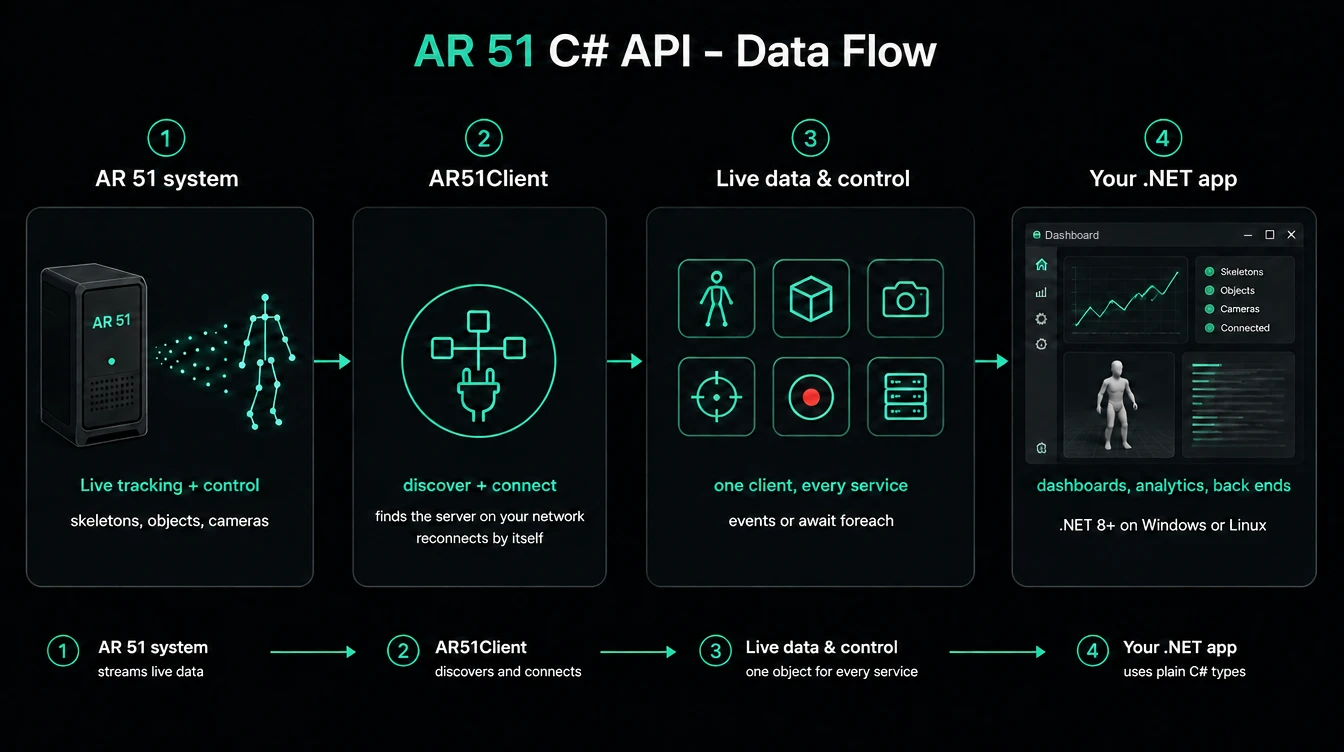
From the AR 51 system to your .NET app: one client object, every service.
Who it's for
Developers building their own software around an AR 51 system, for example:
- a management or monitoring dashboard — server status, camera health, calibration, recording;
- an analytics or research tool that consumes live skeleton data;
- a back end that relays tracking data to other systems or to a web front end.
What you can do
| Area | You can | Guide |
|---|---|---|
| Skeletons | Receive every tracked person's 25 body joints with per-joint confidence; hands from a hand-tracking headset; the registered person's name and headset | Skeletons |
| Objects | Receive tracked objects (for example props) with position and rotation | Objects |
| Cameras | List cameras with calibration values; stream a live JPEG preview; read and change image settings; run auto-tune | Cameras |
| Calibration | Start and stop camera calibration and follow its progress and result; read and set the tracked area | Calibration |
| Recording | Record tracking data and video from the cameras you choose | Recording |
| Servers | See each AR 51 machine's status; launch, quit, force-quit or relaunch the server program; start and stop tracking | Servers and devices |
| Devices | See connected headsets, apps and phones, with battery levels | Servers and devices |
How it fits with the rest of AR 51
| Product | Role |
|---|---|
| AR 51 server | Runs on the AR 51 machines: cameras, tracking, calibration, recording. AR51.Net connects to it. |
| Mocap Studio | AR 51's desktop application for operators — another client of the same server. AR51.Net doesn't need it. |
| Unity SDK / Unreal SDK | For games and VR experiences inside those engines (characters, headsets). Use them in Unity or Unreal; use AR51.Net everywhere else in .NET. |
Several clients can be connected at the same time — for example Mocap Studio, a Unity app and your AR51.Net app. AR51.Net reports what any of them does: a calibration or recording started from Mocap Studio is visible in your app too.
Requirements
- .NET 8 or later. The package targets .NET 8 and .NET 10. Current version: 3.0.302 (3.0.3.2R), numbered the same as the AR 51 Unity SDK.
- Operating system: tested on Windows x64 and Ubuntu 22.04 x64.
- Dependencies (installed with the package): Google.Protobuf, Grpc.Net.Client, Microsoft.Extensions.Logging.Abstractions — all managed, no native libraries.
- AR 51 server: tested with AR 51 server 3.2.0 and 3.2.1.
- Network: your computer must reach the AR 51 machines over the local network.
License
AR51.Net is free to download and is licensed for use with licensed AR 51 systems only. You may build your own apps with it and ship it inside them, to the AR 51 customer you build for and to that customer's own users. The full terms are in the LICENSE.md file inside the package; by installing the package you accept them. Questions: support@ar-51.com.
The samples repository is MIT-licensed — copy and change its code freely.
A first look
using AR51.Net;

await using IAR51Client ar51 = AR51Client.Create();   // finds the AR 51 server on the local network

ar51.Skeletons.SkeletonReceived += (_, e) =>
    Console.WriteLine($"{e.Skeleton.Id}: hips at {e.Skeleton.GetPosition(Joint.MidHip)} m");

await ar51.StartAsync();                               // returns once connected
Console.ReadLine();                                    // keep receiving until Enter
Next steps
- Install and run your first program
- AR51.Net samples — every task as a small, complete program, plus a full web dashboard
- Connecting — discovery, a fixed host, reconnection and shutdown
- Data conventions, threading and errors
- API reference — every type and member